 By Vinod Saini
Last Updated on March 19, 2026 by Vinod Saini
Local SEO 2026: Winning the Map Pack
- Consistency is King: Ensure your NAP (Name, Address, Phone) matches across every digital mention. Small errors = Lost trust.
- Direct Engagement: Use the new WhatsApp Integration to capture leads instantly from the search results page.
- Activity Over Presence: Google rewards active profiles. Post weekly and respond to every review to stay relevant.
- Optimize for AI: Fill out your Services Tab in detail. Google’s AI uses this data to decide if you are the “Best CA” or “Top Clinic” for a query.
- Focus on Reviews with Context: One review saying “Great SEO audit for my SaaS” is worth ten blank 5-star ratings.
If a potential customer searches for your service right now and doesn’t find you, a competitor just got that lead. That’s the reality of local search in 2026 — and your Google Business Profile (GBP) is the single most powerful tool to prevent it.
Google Business Profile (formerly Google My Business) is your free digital storefront. But in 2026, it’s much more than a listing — it’s the source Google’s AI uses to answer local queries directly. Businesses with complete, active profiles now appear inside AI Overviews for searches like “best physiotherapy near me” or “affordable CA firm in Delhi.” Incomplete profiles? Largely invisible.
“Near me” searches have exploded by 900% in the last two years. Businesses in Google’s top-3 local pack receive 126% more traffic and 93% more user actions — calls, directions, and clicks — than those sitting outside it. This guide walks you through 7 practical steps to claim your spot.
Step 1: Claim, Verify, and Lock In Your NAP
Start at business.google.com — claim your profile if you haven’t, or request ownership if it already exists. Verification options include postcard (5–14 days), phone/email (instant for eligible businesses), or video verification introduced in 2025.
Your NAP (Name, Address, Phone) must be consistent across your website, GBP, and all citations. Even a small mismatch — “Pvt. Ltd.” vs “Private Limited” — confuses Google’s entity resolution. Keep your business name clean; no keyword stuffing like “Best SEO Agency Delhi.”
Step 2: Choose Categories with Surgical Precision
Your primary category is the single most influential field in your entire profile. Research what category your top-ranking competitors use, cross-reference it with search volume, then select the most specific match — “SEO Agency” beats “Marketing Agency” if that’s your core service.
Add up to 9 secondary categories for breadth, but only for services you genuinely offer. Over-categorisation triggers Google’s quality filters and can lead to profile suspension.
Step 3: Build a Profile That Earns Trust on Sight
Upload 15–20 high-quality photos: exterior, interior, team in action, products, and service delivery. Businesses with photos see 45% more direction requests and 31% more website clicks compared to those without.
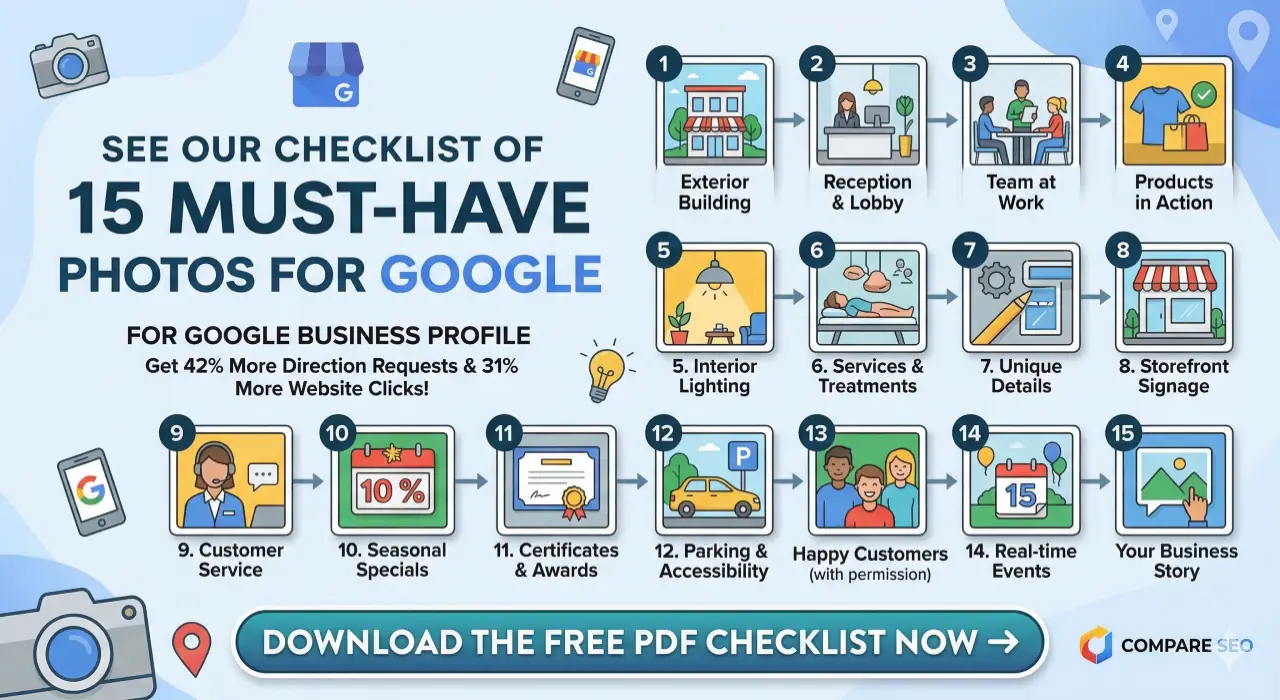
Write a 750-character business description loaded with your core services, location context (e.g., “serving Delhi’s Kashmiri Gate since 2020”), and what makes you genuinely different. Fill every attribute — hours, WhatsApp number, accessibility features, and payment modes — each empty field is a small trust deficit.
Step 4: List Services and Products in Detail
Create individual service/product entries with clear names, prices where applicable (e.g., “Technical SEO Audit – ₹5,000”), and keyword-rich descriptions. Google now cross-references your website’s service descriptions with your GBP Services tab to verify expertise and relevance.
This alignment directly influences whether your profile surfaces in AI Overviews. Want to understand exactly how Google decides which businesses to feature in AI-generated answers? Read our detailed guide: How to Rank in Google AI Overviews →
A digital marketing agency listing “SEO Audit & Strategy,” “Google Ads Management,” and “Social Media Marketing” as separate services sends clear, parseable signals to Google’s systems.
Step 5: Post Weekly — Google Rewards Activity
In 2025, Google made its clearest signal yet: activity and engagement matter, not just presence. Profiles that post regularly, upload fresh photos, and respond to Q&A are rewarded with higher rankings and AI citations.
Post at least once a week — promotions, tips, updates, events. Use clear CTAs like “Call Now,” “Book a Slot,” or “Get a Free Audit.” Posts that include a keyword phrase naturally (e.g., “our local SEO services in South Delhi”) reinforce your topical relevance. Track post impressions in GBP Insights and double down on what performs.
Step 6: Turn Reviews Into a Ranking Engine
Reviews are no longer just social proof — they’re a semantic relevance signal Google’s AI actively reads. A dozen detailed, context-rich reviews outperform fifty generic 5-star ratings with no text. Google now highlights review themes (e.g., “fast delivery,” “expert advice”) directly on profiles.
Aim for 5+ new reviews monthly via post-service email or SMS links. Respond to every review within 24 hours — including negatives. A response like “Thanks, Priya! Glad our schema fixes resolved your indexation issue” reinforces keyword relevance and shows prospective clients you’re attentive. Profiles with 40+ quality reviews consistently rank higher in competitive local packs.
Step 7: Track, Audit, and Iterate Monthly
Use GBP Insights to monitor search queries, profile views, direction requests, and call clicks. Pivot your posts and service descriptions toward queries that are already driving traffic. Connect GBP to Google Analytics using UTM parameters to measure actual ROI from profile visits.
Run a monthly audit: check for unauthorized edits, review competitor gaps with tools like LocalFalcon or BrightLocal, validate schema markup on your website, and update seasonal hours or promotions. Fully optimized profiles see 2.6x more views than incomplete ones — consistent maintenance is what keeps them there.
3 New Trends Reshaping GBP in 2026
AI Overviews Are Now a Local Battleground
Since mid-2024, Google’s AI Overviews feature has appeared in a growing share of local search queries — and it pulls answers directly from verified, complete GBP listings. If your profile is incomplete or unverified, you’re invisible in these AI-generated answers. This isn’t a future risk — it’s happening right now, and it’s a permanent structural shift.
Action: Ensure your profile, website, and GBP Services tab all use consistent service language. AI agents compare them. For a deeper breakdown, see: How to Rank in Google AI Overviews →
Voice and Conversational Search
By 2026, AI-powered assistants are projected to handle roughly 25% of all global search queries. Voice searches are hyper-local and conversational — “Where can I get a GST filing done near Lajpat Nagar?” — and GBP listings optimised with natural-language service descriptions perform significantly better in these results.
Action: Write service descriptions and posts in plain, conversational language that mirrors how people actually speak.
WhatsApp Integration and Real-Time Engagement
Google introduced direct WhatsApp integration for GBP in 2025, allowing customers to message businesses without leaving Google Search. For Indian SMBs, D2C brands, and service providers, this is a frictionless lead capture tool built directly into local search.
Action: Connect your WhatsApp Business number in your GBP profile under messaging settings.
Frequently Asked Questions
What does it mean to optimize Google My Business?
Optimizing Google My Business means completing every profile section — NAP, categories, photos, services, and reviews — and keeping it consistently active. An optimized profile ranks higher in local packs, earns AI Overview citations, and drives measurably more calls, clicks, and footfall than an incomplete one.
How do I optimize Google My Business without spending money?
Verify your profile, upload quality photos, select precise categories, list services with descriptions, post weekly, and actively collect reviews. GBP is completely free. Businesses using this consistently see up to 42% more direction requests without running a single paid ad.
Does optimizing a Google My Business listing improve overall SEO?
Yes. GBP signals — including reviews, proximity, and profile completeness — account for 15–20% of local SEO ranking factors. A well-optimized profile boosts map pack visibility and, when paired with website schema markup, strengthens your entity signals in AI-generated results.
How often should I update my Google Business Profile?
Post weekly, add new photos monthly, and run a full audit quarterly. Since 2025, Google actively rewards profile activity as a freshness and trust signal. Stagnant profiles lose ground to competitors who update consistently — especially in high-competition markets like Delhi, Mumbai, and Bengaluru.
Why are detailed reviews more valuable than star ratings alone?
Google’s AI reads review text to extract themes, service mentions, and location context — all of which feed into relevance scoring. A review mentioning “best CA for GST filing in Nehru Place” signals far more to Google than a blank 5-star rating. Always encourage customers to describe what they experienced, not just rate it.
🚀 Get Your Free Technical SEO Audit
We'll identify critical issues hurting your rankings — delivered in 24 hours, no obligation.
Get Free Audit →

